← Odoo 20: all the new features
Odoo 20 · HR & Payroll
Odoo 20 overhauls the foundations of Belgian payroll. Joint committees are now managed as reference data, a single monthly structure covers employees, students and PFI plans (Walloon on-the-job training), and the calculation of flexi-jobs in the hospitality (horeca) sector is supported. The Dimona declaration is made directly from Odoo. Work entries are removed: the payslip is calculated from the working schedule, time off and public holidays, the latter being loaded automatically. On the HR side, the Attendances, Appraisals and Recruitment apps evolve: a photo at check-in, 360° feedback open to external contacts, and a candidate matching score.
- Belgian payroll
- Payroll
- Employees
- Time Off
- Attendances
- Appraisals and recruitment
- Minor new features
Contents: 29 feature sheets
- The Dimona declaration is made directly from Odoo
- Joint committees are managed as reference data in Odoo
- The calculation of hospitality (horeca) flexi-jobs is supported in Odoo
- A single monthly payroll structure, applicable to students and PFI plans
- A dedicated report for ordering meal vouchers
- Company directors' remuneration is supported
- A preconfigured catalogue of benefits
- The payroll dashboard flags blocking issues
- Payroll is processed in stages, with a test print
- The payslip is calculated from time off and the working schedule
- Time exports adopt a standard format
- Salary indexation by percentage or fixed amount
- Net-to-gross salary simulation
- The payroll audit trail
- The “to be reviewed” status and the “Assistant” right
- Correcting a payslip with a “delta” payslip
- Fiscal mapping of salary rules
- Variable schedules are defined in a calendar
- HR documents can have a single signer
- Time off is deducted in working days or calendar days
- The country's public holidays are loaded automatically
- Time rules replace overtime rules
- Photo taken at check-in
- Single check-in and automatic check-out time
- The overtime analysis report
- The right to edit one's own attendances
- 360° feedback open to external contacts
- Integration of candidates, talent pools and job positions
- The candidate matching score
Belgian payroll
The Dimona declaration is made directly from Odoo
Core Belgian payroll already contains the DIMONA, Dimona Declarations and Dimona Periods menus, and the employee form has the “Check Dimona” and “Open Dimona” buttons. When a new employee is saved, Odoo creates a “Dimona” activity: declare the start of employment on the socialsecurity.be portal. Automatic submission requires a separate module, which is not installed by default.
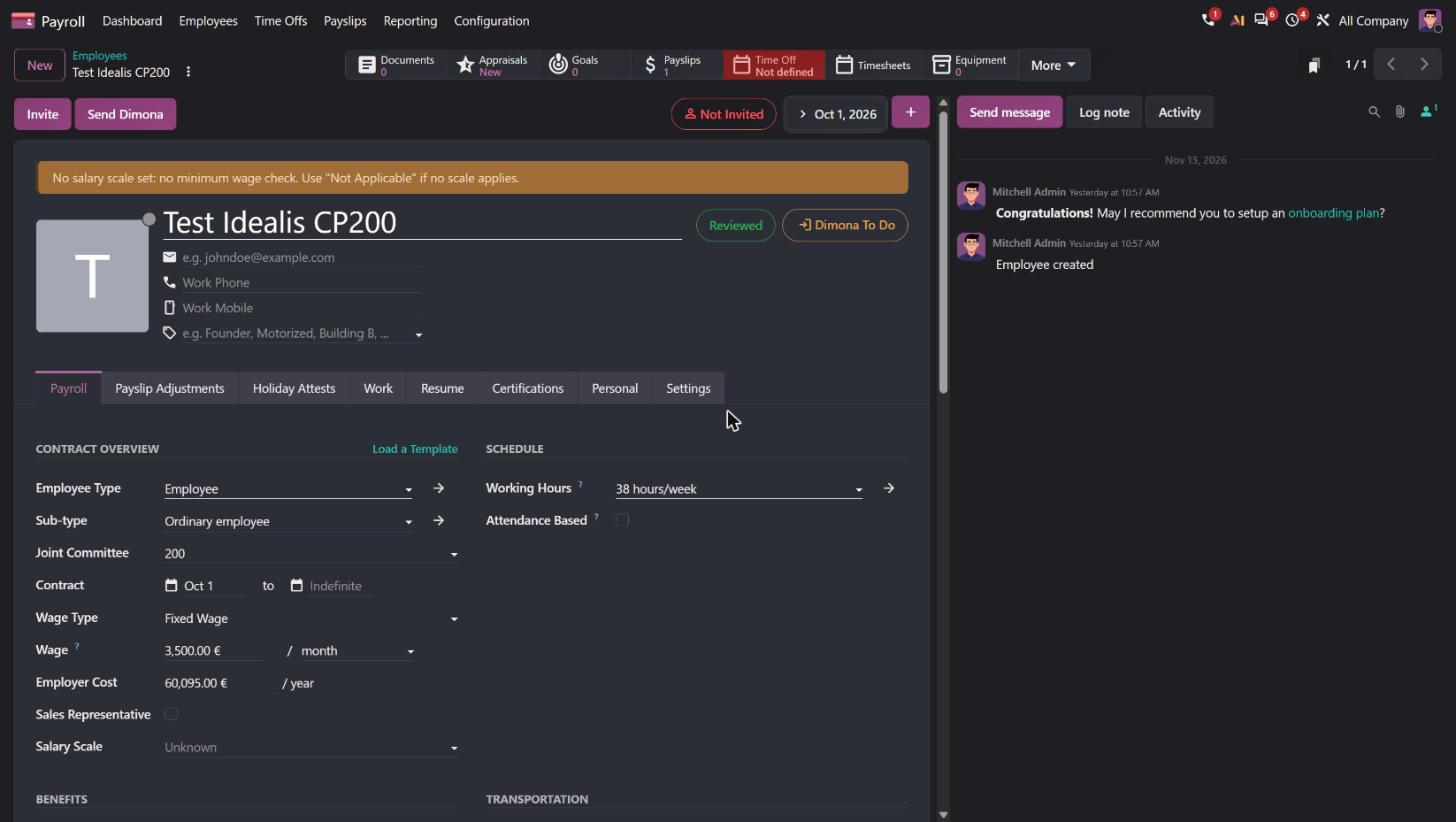
The catalogue no longer includes a separate Dimona module. As soon as the contract date is entered, the employee form shows “Send Dimona” and the status “Dimona To Do”. The Belgian payroll settings bring together the certificate for the National Social Security Office (ONSS), with the option “Automate Dimona, DMFA and DRS submissions via API”, and the “Dimona Environment” field. The reports add Dimona Relations and DRS. According to the release notes, the Dimona flow is automated; submission requires an ONSS certificate.

- Belgian use case
- A Brussels-based SME under CP 200 (auxiliary joint committee for salaried employees) hires an employee on 1 October: the Dimona IN is sent from her record in Odoo, without using the social security portal.
- Source
- Odoo 20 release notes, section Localizations › Belgium › Payroll: “The Dimona flow is now supported (available from 19.0) and has been automated.” Official Odoo video 15:30 ↗.
Joint committees are managed as reference data in Odoo
No “joint committee” object. The CP is carried by the structure type (“CP200 BE”, “CP200 PFI BE”). Configuration › Belgium contains only “DMFA: Work Locations”.
Configuration › Belgium › Joint Committees menu: 237 joint committees with code, parent CP (e.g. 102.01 → 102) and an “Active” checkbox. The main CP is chosen in the company data (“Main Joint Committee”) and on the employee. Choosing CP 200 activates the 10 Belgian structures; some structures are reserved for one CP (13th Month and CCT90: CP 200) or exclude one CP (999).
- Belgian use case
- A group with one company under CP 200 and a hotel under CP 302 (joint committee for the hotel and catering industry) chooses the committee for each company: Odoo activates only the structures and rules that apply to it.
- Source
- Odoo 20 release notes, Belgium › Payroll: “The ‘Joint Committee’ object and all associated data have been added.”; “Joint committees can now be part of a parent joint committee”. Official Odoo video 6:41 ↗, 12:59 and 42:53 (V20 limited to CP 200 and 302).
The calculation of hospitality (horeca) flexi-jobs is supported in Odoo
No flexi employee type and no Flexi@Work report.
Employee types “Flexi-Employee” and “Flexi-Worker”, “Flexi@Work” report. According to the release notes: calculation of FLX payslips under CP 302, 7.67% holiday pay and 28% employer contribution automated, 2026 annual ceilings monitored, CP 302 year-end bonus.
- Belgian use case
- A Ghent restaurant under CP 302 pays its weekend flexi-jobs: holiday pay and the 28% contribution are calculated, and Odoo flags when a worker is approaching the annual ceiling.
- Source
- Odoo 20 release notes, Belgium › Payroll (CP 302 flexi-jobs, 7.67% holiday pay, 28% contribution, 2026 ceilings, CP 302 year-end bonus).
A single monthly payroll structure, applicable to students and PFI plans
5 structure types (CP200 BE, Employee, Worker, CP200 PFI BE, Belgian Student) and 14 structures. “CP200: Employees Monthly Pay” has 73 rules; students and PFI have their own structure.
A single “Belgium Pay” type (38 h/week) and 10 structures. “Monthly Pay (BE)” has 239 rules and covers students and PFI; a “Profit Sharing Bonus (BE)” structure appears.
- Belgian use case
- An employer under CP 200 hosting a PFI trainee and summer students keeps a single monthly structure: the rules specific to each status apply automatically.
- Source
- Odoo 20 release notes, Belgium › Payroll: “The monthly salary structures have been merged into a single ‘Regular Pay’ structure, with adapted rules for students and PFI.”
A dedicated report for ordering meal vouchers
A “Meal Vouchers” report already exists; the employee deduction is calculated per day worked (example: 16 days × €1.09).
According to the release notes: new reporting for ordering meal vouchers and an employee contribution configurable per voucher. The “Meal Vouchers” report is present.
- Belgian use case
- Each month, the HR department of a Liège-based SME extracts the number of meal vouchers to order from the issuer and applies an employee share of €1.09.
- Source
- Odoo 20 release notes, Belgium › Payroll: “New reporting has been added for meal voucher ordering.”; “Configure the employee’s contribution per meal voucher.”. Official Odoo video 15:23 ↗ and 35:04.
Company directors' remuneration is supported
No “director” type: the employee type is a simple list on the record.
Employee Types menu with “Company Director (Employment Contract, Paid Mandate)” and “Business Leader”. According to the release notes, company directors' remuneration is now supported.
- Belgian use case
- The manager of an SRL (private limited company), a paid director, is paid in Odoo with the same tools as his employees.
- Source
- Odoo 20 release notes, Belgium › Payroll: “Remuneration for company directors is now supported.” Official Odoo video 42:53 ↗.
A preconfigured catalogue of benefits
Ten default values in the Belgian payroll settings (fuel card, Internet, mobile, meal vouchers €7.45, eco-vouchers €250…), carried over to the employee.
Configuration › Benefits menu: 83 benefits classified as Monthly Benefit in Kind (66), Monthly Benefit in Net (2), Monthly Benefit in Cash (4), Yearly Benefits in Cash (9) and Daily Benefit in Kind (2), with a “Joint Committees” column.
- Belgian use case
- A consulting firm activates the benefits it grants (car, PC, mobile phone, meal vouchers) and hides the others, with no specific configuration.
- Source
- Official Odoo video 14:08 ↗ (“88” benefits announced).
Payroll
The payroll dashboard flags blocking issues
With no employees, an illustrated welcome screen (“Ready to simplify your payroll?”). Payslip calculated with no warning.
The dashboard shows a “Today” list of tasks (choose the pay calendar, configure the company, the layout, create the first employee), each with “Hide warning”. On the payslip, a red banner blocks while the employer category is missing (“Employer category required to import ONSS rates. → Set Employer Category”) and leads straight to the field; on the employee, an orange banner flags the missing salary scale.
- Belgian use case
- Before month-end payroll, the manager identifies on a single screen the items that would prevent an accurate calculation (ONSS category, missing salary scale) and fixes them from the alert.
- Source
- Odoo 20 release notes, Payroll section, “Dashboard”: “The Payroll dashboard has been revamped to focus on warnings for setup and day-to-day control of pay.”; Belgium › Payroll: “Temporarily dismiss warnings in the Payroll dashboard without discarding them permanently”. Official Odoo video 32:05 ↗ and 35:10; official Odoo video 18:31 ↗ ; official Odoo video 11:41 ↗ ; official Odoo video 1:51:23 ↗ ; official Odoo video 1:42 ↗.
Payroll is processed in stages, with a test print
The payslip has a “Pay Run” field (Off-Cycle by default).
Payslips › “Pay Runs” menu. According to the release notes: staged processing, a test print with no legal value and a discussion thread on the pay run.
- Belgian use case
- The HR office of an SME prints a trial payroll, submits it to the manager for review, then starts the final processing.
- Source
- Odoo 20 release notes, Payroll section: “Pay run workflow”, “Test print pay runs”, “Chatter on pay runs”. Official Odoo video 29:51 ↗ ; official Odoo video 11:49 ↗ ; official Odoo video 5:02 ↗.
The payslip is calculated from time off and the working schedule
Two lists to maintain: 41 work entry types (Work Entry Types) and 18 time off types linked to a work entry. The Payroll menu contains “Work Entries”; the payslip is calculated from the generated work entries (Worked Days tab). Example on a November payslip: Unpaid 5 days, Attendance 16 days, 11 November counted as worked.
A single list of 119 “Time Types” with their DmfA code (multifunctional quarterly declaration to the ONSS), shared by Payroll and Time Off. The “Work Entries” menu becomes “Time Offs”. The payslip shows cards calculated directly from the schedule, time off and public holidays. Example on a November payslip: Work 15 days, Leave without pay 4 days, Work from home 1 day, Public holiday 1 day (11/11). Gross €2,853.85, ONSS contribution 13.07%, net €2,098.88.


- Belgian use case
- A CP 200 employee takes a week of unpaid leave: the November payslip takes it into account from the calculation, without generating or regenerating work entries.
- Source
- Odoo 20 release notes, Payroll section, “Work entries removal”: “Work entries and the Planning-Payroll integration have been removed. Work entry types and time off types have been merged.” GitHub (20.0 branch). Official Odoo video 12:06 ↗ ; official Odoo video 40:48 ↗ and 41:20; official Odoo video 10:38 ↗.
- What Idealis brings
- Carrying over existing work entry and time off types during the migration.
Time exports adopt a standard format
Six export modules for social secretariats: Acerta, Group S, Partena, Prisma, SD Worx and UCM.
None of these six modules is in the Odoo 20 catalogue. In addition, according to the release notes, all time entry exports follow a standard format.
- Belgian use case
- An SME that keeps its payroll with a social secretariat sends it its time data in a file in the standard format.
- Source
- Odoo 20 release notes, Payroll section, “Time entry exports”: “All time entry exports now follow a standard format.” Odoo 20 source code (GitHub).
Salary indexation by percentage or fixed amount
No equivalent feature is described for Odoo 19.
According to the release notes, salary indexation is applied as a percentage, a fixed amount, or both.
- Belgian use case
- On 1 January, a company under CP 200 applies the sector-wide indexation to all its employees in a single operation.
- Source
- Odoo 20 release notes, Payroll section, “Salary indexation”: “Increase an employee's salary by a percentage and/or a fixed amount.” Official Odoo video 12:13 ↗.
Net-to-gross salary simulation
No equivalent feature is described for Odoo 19.
According to the release notes, a salary can be simulated from a net amount. According to the video, the simulation is launched from the employee record.
- Belgian use case
- A candidate asks for €2,500 net: the recruiter gets the gross salary and the employer cost to offer, from Odoo.
- Source
- Odoo 20 release notes, Payroll section, “Net to gross simulation”: “Perform a salary simulation based on a net amount.” Official Odoo video 33:37 ↗ ; official Odoo video 12:05 ↗ and 12:32.
The payroll audit trail
No “Audit Trail” report in the Payroll Reports menu.
Reports › “Audit Trail”. According to the video, this log cannot be disabled.
- Belgian use case
- During a social inspection, the manager can find who changed an employee's salary, and when.
- Source
- Official Odoo video 32:55 ↗ and 47:51.
The “to be reviewed” status and the “Assistant” right
No equivalent feature is described for Odoo 19.
“Reviewed” badge on the employee record. According to the video: “to be reviewed” status after a contract change, reason for change, “Assistant” right.
Correcting a payslip with a “delta” payslip
No equivalent feature is described for Odoo 19.
According to the video: a validated payslip is corrected by a new version or a correction, with a negative payslip and a “delta” payslip. On the draft payslip, the actions are Delete, Send By Email, Reset and Send to Off-Cycle.
- Belgian use case
- A bonus forgotten in October is regularised in November with a delta payslip, without cancelling the October payroll.
- Source
- Official Odoo video 33:12 ↗ and 34:09.
Fiscal mapping of salary rules
No fiscal mapping menu.
Configuration › Belgium › “Fiscal Mapping” menu. According to the video, it links salary rules to the tax declarations.
- Belgian use case
- A company-specific salary rule is attached to the right box of the 281.10 forms, with no custom development.
- Source
- Official Odoo video 38:53 ↗.
Employees
Variable schedules are defined in a calendar
No equivalent feature is described for Odoo 19.
According to the release notes, a variable working schedule is defined in calendar mode.
- Belgian use case
- A shop whose sales staff change schedule every week enters their hours in a calendar, without creating a schedule for each combination.
- Source
- Odoo 20 release notes, Employees section, “Variable working schedule”. Official Odoo video 4:07 ↗ and 9:53.
HR documents can have a single signer
No equivalent feature is described for Odoo 19.
According to the release notes, HR documents can have just one signer.
- Belgian use case
- An employment certificate is sent for signature by the employee alone, without an approval workflow.
- Source
- Odoo 20 release notes, Employees section, “Single-signer HR documents”.
Time Off
Time off is deducted in working days or calendar days
No equivalent feature is described for Odoo 19.
The number of days taken is calculated in working days or in calendar days.
- Belgian use case
- Compassionate leave counted in calendar days and annual leave in working days coexist in the same company.
- Source
- Odoo 20 release notes, Time Off section: “Calendar day vs working day deductions”. Official Odoo video 15:54 ↗.
The country's public holidays are loaded automatically
No public holidays loaded: on the November payslip, 11 November is counted as a day worked.
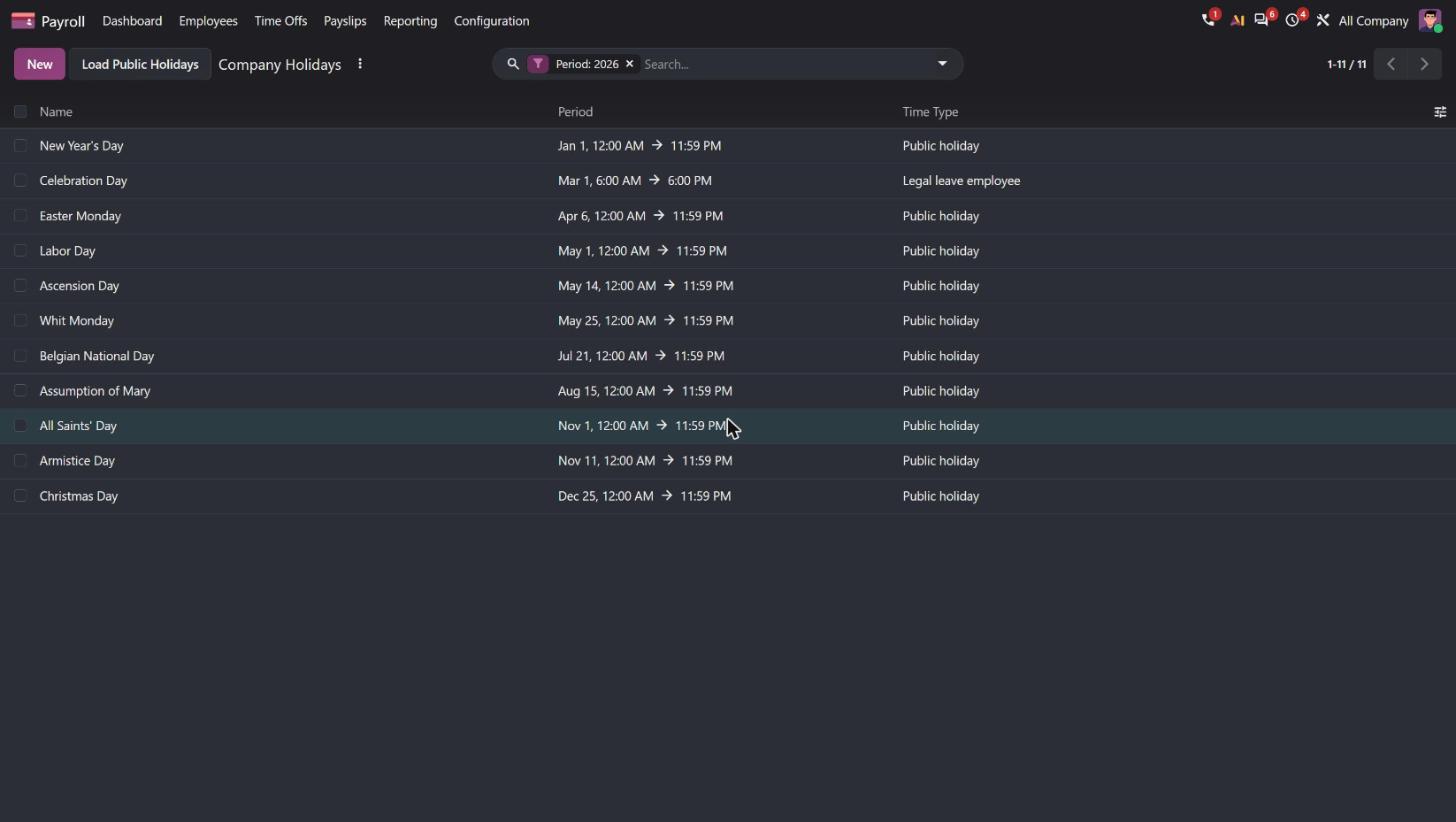
The “Public Holidays” panel in Time Off is populated without any user action (Armistice Day, Christmas, New Year, Easter 2027, National Day…). The November payslip shows “Public holiday · 1 day”.

- Belgian use case
- A new Belgian company starts on Odoo: the 10 statutory public holidays are already in place and are automatically carried into payroll.
- Source
- Odoo 20 release notes, Time Off › Public holidays section: “The ‘Public Holiday’ time type is now available by default for all localizations” and “Public holidays can now be loaded for the year, with holidays corresponding to the company’s country automatically suggested”. Odoo 20 source code (GitHub). Official Odoo video 12:50 ↗.
Attendances
Time rules replace overtime rules
Overtime rules in Attendances.
According to the official video, new “time rules” manage the payment rate and the compensation of worked time.
Photo taken at check-in
No equivalent feature is described for Odoo 19.
If the check-in device has a camera, a photo of the employee is taken on arrival.
- Belgian use case
- A workshop that checks in on a tablet at the entrance can prevent one colleague from clocking in for another.
- Source
- Odoo 20 release notes, Attendances section: “Photo at check-in”. Odoo 20 source code (GitHub). Official Odoo video 19:41 ↗ and 20:52.
Single check-in and automatic check-out time
No equivalent feature is described for Odoo 19.
A “Single check-in system” records only the first arrival during the schedule, with automatic check-out; employees on a flexible schedule can set an automatic check-out time.
- Belgian use case
- In a bakery, the employee checks in only on arrival: the check-out is recorded at the scheduled time.
- Source
- Odoo 20 release notes, Attendances section: “Single check-in mode” and “Automatic check-out time”. Odoo 20 source code (GitHub). Official Odoo video 19:09 ↗.
The overtime analysis report
No equivalent feature is described for Odoo 19.
An analysis report shows overtime and the rule applied to each entry.
- Belgian use case
- A warehouse manager checks, before payroll, which overtime hours are to be recovered and which are paid.
- Source
- Odoo 20 release notes, Attendances section: “Overtime analysis report”.
The right to edit one's own attendances
No equivalent feature is described for Odoo 19.
According to the webinar, an access right allows the employee to edit their own attendances.
- Belgian use case
- A consultant who forgot to check in corrects their own arrival time, without asking the HR department.
- Source
- Official Odoo video 19:47 ↗.
Appraisals and recruitment
360° feedback open to external contacts
No equivalent feature is described for Odoo 19.
360° feedback requests can be sent to any contact, not only to employees.
- Belgian use case
- An agency asks a client for their opinion on the project manager who follows them, as part of the annual appraisal.
- Source
- Odoo 20 release notes, Appraisals section: “External 360 feedbacks”. Official Odoo video 14:25 ↗.
Integration of candidates, talent pools and job positions
No equivalent feature is described for Odoo 19.
According to the release notes, candidates, talent pools and job positions are integrated; talents can be accessed from the job position.
- Belgian use case
- When opening an accountant position, the recruiter draws on candidates from last year's talent pool.
- Source
- Odoo 20 release notes, Recruitment section, “Improved integration” and “View talents from job position”. Official Odoo video 30:13 ↗ and 32:53.
The candidate matching score
No equivalent feature is described for Odoo 19.
According to the release notes, each candidate receives a matching score for the position and sees their missing skills.
- Belgian use case
- For an HVAC technician position, the recruiter sorts applications by score and sees who lacks the required certification.
- Source
- Odoo 20 release notes, Recruitment section, “Matching score filter”. Official Odoo video 43:47 ↗ ; official Odoo video 28:48 ↗.
Minor new features
Belgian payroll
- Profit sharing bonus
- Salary cap for private car remuneration
- Reorganisation measures in schedules
- Warnings that can be dismissed temporarily
Payroll
- Payslip sending options
- Contract dates locked when payslips are affected
- Multi-category and multi-structure salary rules
- Employee type by company or branch
- Streamlined “Salary Computation” tab
- Schedules in duration per day
- Driver assignment Payroll ↔ Fleet
- Salary rules on expense products. See Finance & Accounting.
- Explanation of how each line is calculated
- Calculation passes after all employees
- Bulk entry of salary adjustments
- “Attendances” button on the payslip
Employees
- Remote work merged into Employees
- Multi-company directory
- Employees' Documents folder, payslips kept separate
- Simplified employee departure
- Single job description, back office and website
Time Off
- Minimum duration of a request
- Overview of all employees
- “No” right on Time Off
Attendances
- Public holidays in rulesets
- Colour-coded Gantt
- Ruleset smart button
- eSSL and Mantra devices
- Access blocked without rights
- Filters by schedule and by day
Appraisals
- Bulk actions
- Parent goal progression
- Template chosen by department
- Next appraisal date editable by the manager
- Activity plans
Recruitment
- Visibility conditions on the online form
- Prospecting follow-up
eLearning
- Courses accessible from the portal
- Dynamic blocks for jobs and courses
Fleet
- Equipment linked to a vehicle